AI at Work training path · self-paced
Decide what the agent may do. Then check what it actually did.Be the person who knows when to say yes, and when to say stop.AI can write the perfect customer email. Be the one who checks what else it did.
Learn to decide how much an AI workflow should do on its own, fence what it can touch and test it before anyone relies on it. Then judge each run by what it did, not what it said, with Coach Q beside you.
For anyone whose work now runs through AI tools, and the managers responsible for it.
- 7 live courses
- 12 more on the way
- Step 1: about 3.5 hours
- Coach Q in every course
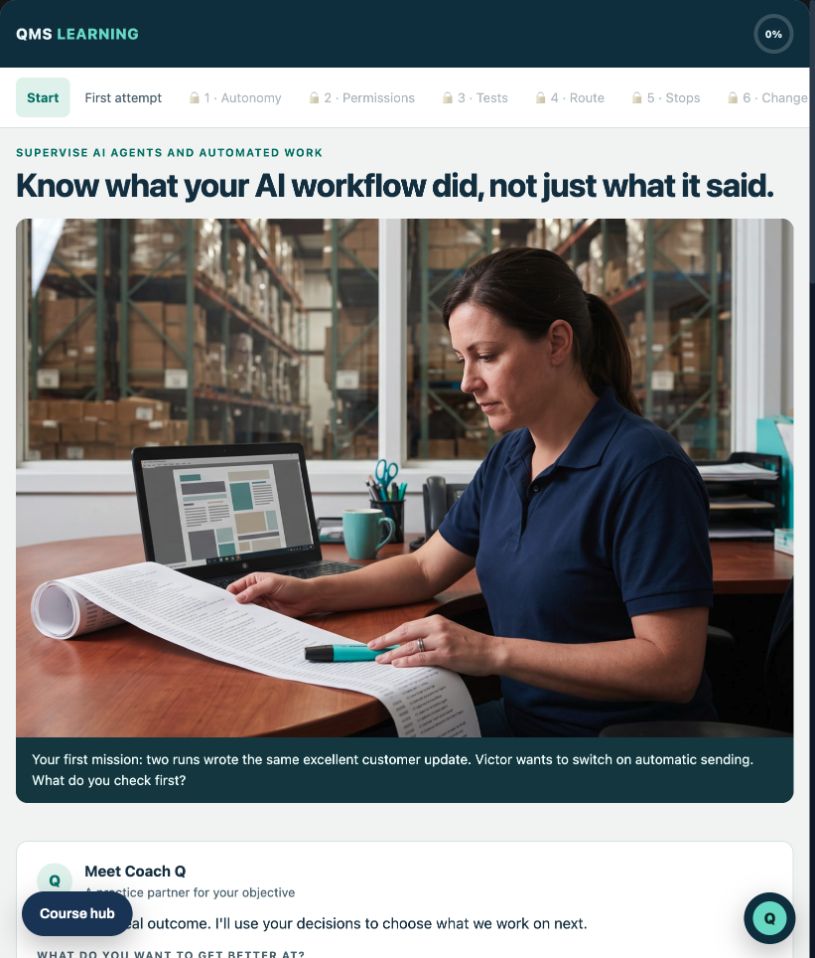
Sound familiar?
If your team runs work through an assistant, you've heard these.
The demo looked perfect. Let's turn it on.
One good demo tests one ordinary case. In Supervise AI Agents and Automated Work you build a test set with the missing, conflicting, duplicate, hostile and broken cases too, each with a pass condition, before anyone relies on it.
The assistant says it updated the record.
That's its own account of its work. The trace is the record. In the Supervise AI Agents course you read runs event by event, keep attempted, completed and confirmed apart, and call out success claims the trace doesn't support.
We approve it every morning when it starts. We're covered.
Approving the start of a session doesn't cover every send after it. Supervise AI Agents and Automated Work puts the approval on the consequential action, the send or the record change, where a named person approves it.
It timed out, so it tried again. Now the customer has two emails.
Retrying a read changes nothing. Repeating a send doubles the effect. The Supervise AI Agents course has you set retry limits for each action, stop conditions, and an exit that tells a named owner what's known, what isn't and what wasn't done.
What it does for you
Be the one they ask before it's switched on.
The yes that means something
Anyone can be impressed by a demo. You'll be able to say what a workflow may touch, how it was tested and when it stops, and show the brief that backs it up.
The job that grows as AI does
The more work your team hands to AI tools, the more someone has to set the rules and check the results. Be the person who already knows how.
Proof on your record
An unseen case reviewed by a person, a final exam and a certificate anyone can verify, for your training record and your LinkedIn.
No course can promise you a raise or a title. What you'll have is the skill, the work to show for it and a certificate anyone can verify. That's what those conversations run on.
Why it matters
AI output is going into real work unchecked.
In a 2025 global study across 47 countries by the University of Melbourne and KPMG, two thirds (66%) of the employees asked reported using AI output in their work without evaluating it.
The same study found 56% had made mistakes in their work due to AI, and only two in five employees said their organization had a policy or guidance on generative AI use. Where nobody has written the rules, the check falls to the person whose name is on the work.
With an agent, the stakes go up. A draft waits for you to read it. An agent that sends, updates records or opens files can act before you see it, and its last message is its own account of the run. The trace is the record. Your customer sees what your company sent.
The full path
Check the output. Define the handoff. Fix the process. Supervise the work.
Start by reviewing the output you approve. Define the outcome, inputs and tests before handing off a task. Fix the process before you automate any of it. Then learn to supervise workflows that can act: their permissions, tests and action traces. When the decision rests on numbers, read them right before anyone acts. Each course stands alone, so take the ones your job needs.
Step 1 · Check the output before you approve it
Check AI Work Before You Approve It
Trace claims to their sources, check calculations and scope, and state a supported decision with a clear approval boundary. Six modules, hands-on labs, an independent instructor-reviewed case and a 30-question final exam.
You walk out with an evidence ledger, corrected report, decision memo and an assessed certificate of completion anyone can verify.
- About 3.5 hours
- Final exam
- Instructor-reviewed case
- Verifiable certificate
See what you get →See the complete offer, then the price.
Step 2 · Define the work and test the handoff
Define the Work Before You Delegate It
Turn a vague request into a bounded task brief: intended user, decision, approved inputs, permissions, acceptance tests and exception rules. Test it with a simulated executor, then complete an instructor-reviewed case and final exam.
You walk out with a task brief, acceptance tests, exception rules and revision log, plus an assessed certificate of completion.
- About 3.5 hours
- Six modules
- Seven narrated explainers
- Lesson 1 free
See what you get →See the complete offer, then the price.
Step 3 · Fix the process before you automate it
Improve a Process Before You Automate It
Map the route people actually follow, split touch time from waiting and rework, test causes against records, and decide which steps to remove, simplify, automate or keep with a person. Ends with an unseen case a person reviews and a 30-question final exam.
You walk out with a current-state map, a time ladder, a future-state map with every human decision marked, a benefits ledger and a pilot charter with a way back.
- About 5 hours
- Final exam
- Certificate anyone can verify
- Lesson 1 free
See what you get →See the complete offer, then the price.
-
Step 4 · Set the rules, check the work
Supervise AI Agents and Automated Work
Size a workflow's autonomy, fence its permissions, test the missing, duplicate, hostile and broken cases, and score each run from its action trace. Ends with an unseen case a person reviews and a 30-question final exam.
You walk out with an operating brief built lab by lab on a fictional assistant: permission matrix, test set, scored traces, exception playbook, change checklist, and a plan for your own first workflow.
- About 3.5 hours
- Final exam
- Certificate anyone can verify
- Lesson 1 free
See what you get →The course page shows everything included, then the price.
Step 5 · Write and verify the instruction
Write Work Instructions People Actually Follow
Diagnose the skipped method, draft from authorized evidence, test usability safely, control release and check critical-step adherence.
You walk out with six draft workplace records and an assessed certificate after the required completion and assessments.
- About 3.5 to 4 hours
- Six modules
- Seven narrated explainers
- Lesson 1 free
See what you get →See the complete offer, then the price.
Step 6 · Review audit evidence with AI
Review Audit Evidence with AI
Plan the sample, trace claims, investigate gaps and draft defensible findings with human judgment.
You walk out with six linked audit records and assessed course completion after required labs, reviewed case and exam.
- About 3.5 to 4 hours
- Six modules
- Seven narrated explainers
- Lesson 1 free
See what you get →See the offer, then the price.
Step 7 · Read the numbers before anyone decides
Make Better Decisions with Workplace Data
Define a measure, check the records, compare rates fairly, read a weekly chart and recommend a step sized to the evidence. Then review an AI analysis with planted mistakes. Ends with an unseen case a reviewer scores and a 30-question final exam.
You walk out with a metric card, cleaning log, weekly chart spec, decision memo and AI data review card, plus an assessed certificate of completion.
- About 4 hours
- Final exam
- Reviewer-scored case
- Lesson 1 free
See what you get →See the complete offer, then the price.
On the way in this path
More AI at Work courses are on the way; join the waitlist on the ones you want and we'll email you when each one opens.
-
On the way
AI for Quality Teams
Put AI to work on audits, CAPA and documents.
-
On the way
Troubleshoot Exceptions
Handle the cases automation can't.
-
On the way
Lead AI Change
Bring a team through an AI rollout.
-
On the way
Robotics and Automation Awareness
What robots and automation change on the floor.
-
On the way
Maintaining Connected Systems
Keep connected equipment running and secure.
-
On the way
AI for Sales and Estimating
Faster quotes you can still stand behind.
-
On the way
AI for Operations and Production
Use AI on schedules, standups and shop data.
-
On the way
AI for Purchasing and Supply Chain
Use AI on supplier data, POs and follow-ups.
-
On the way
AI for HR and Safety
Use AI on policies, training and incident follow-up.
-
On the way
AI for Owners and Leaders: Policy, Risk and Return
Set the rules, weigh the risk, measure the return.
-
On the way
AI Governance and Ethics
Policies and controls for how your company uses AI.
-
On the way
Protect Information with AI
Use AI tools without leaking what you shouldn't.
Not like training used to be
Short, hands-on, built around you. And the coach stays.
Training used to mean days in a classroom or hours of video. Here are real screens from this path: short sessions where you make the call, a plan that fits your week, and an expert in your pocket in every course.
Coach Q · from Supervise AI Agents and Automated Work
Not for the sends. Approving the session covers starting the session. The consequential action is the send to a customer, so that's where a named person approves.
And a prompt isn't a lock. If the platform can hold a message until someone releases it, enforce it there, and keep the instruction as a second layer.
Which actions in your workflow could reach a customer or change a record? Those are the ones to list first.
Coaching, not decisions. You make the call. Comes with every course, no renewal fee.
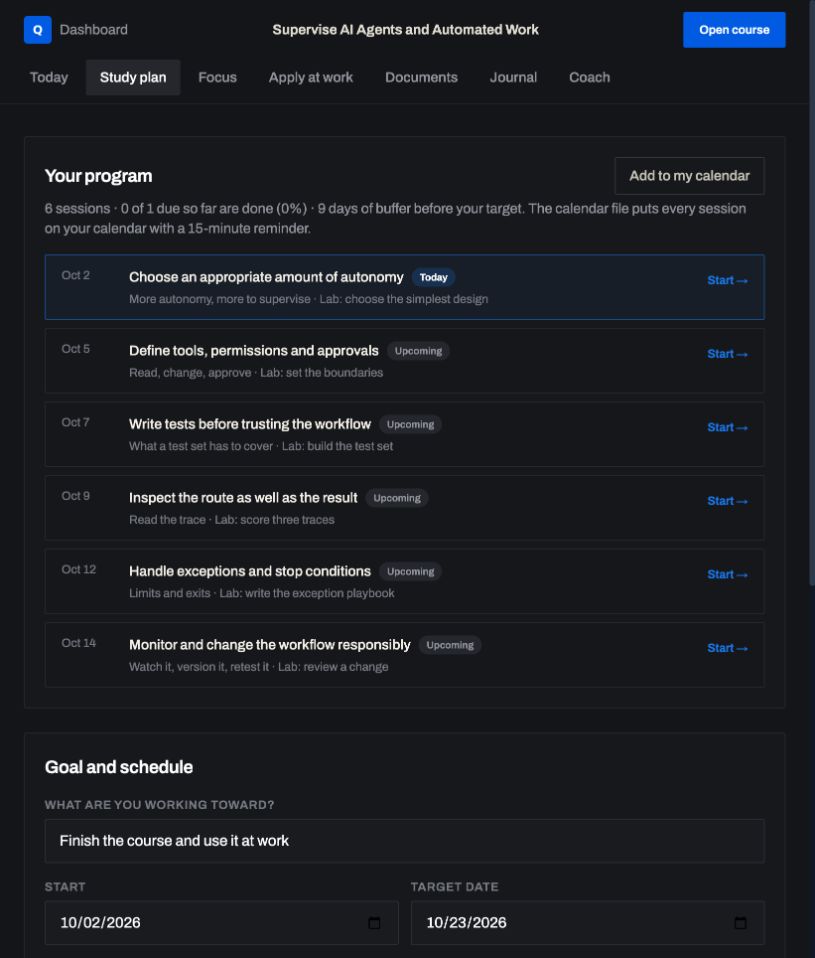
Study plan · Your personal trainer
Tell it your goal date. It builds sessions around your week and shows each day whether you're on plan, so the course actually gets finished.
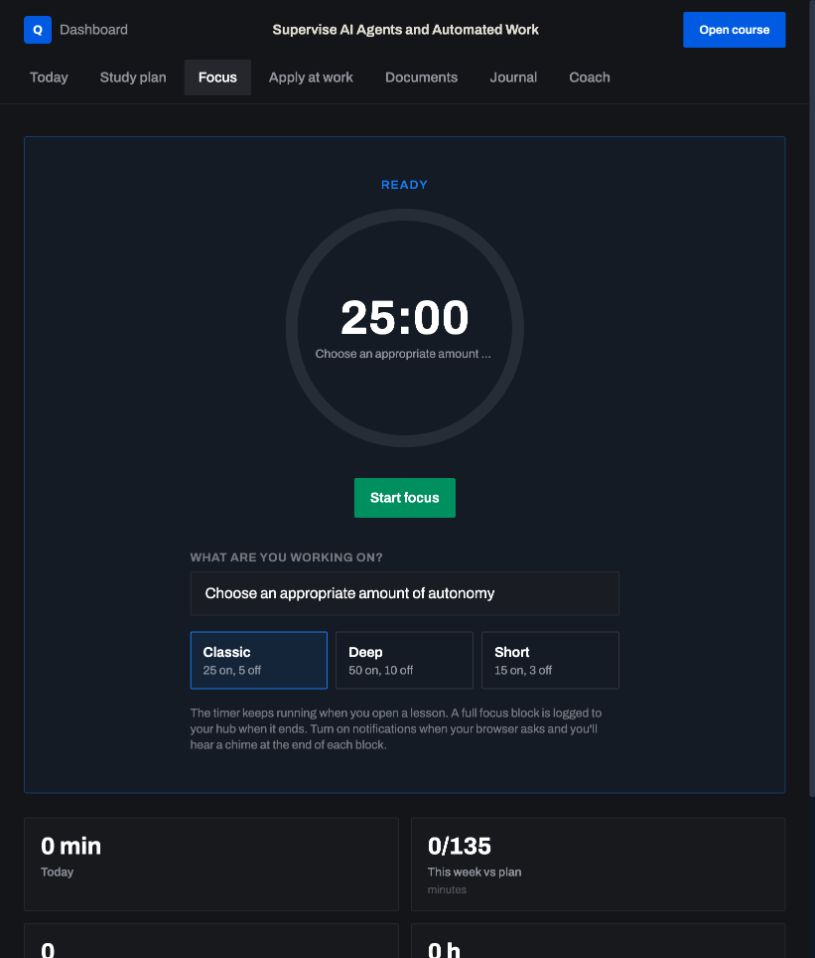
Focus timer · 25 minutes, no tab-hopping
One click starts a focused session, and it follows you from lesson to lesson. Short sessions are how busy people finish.
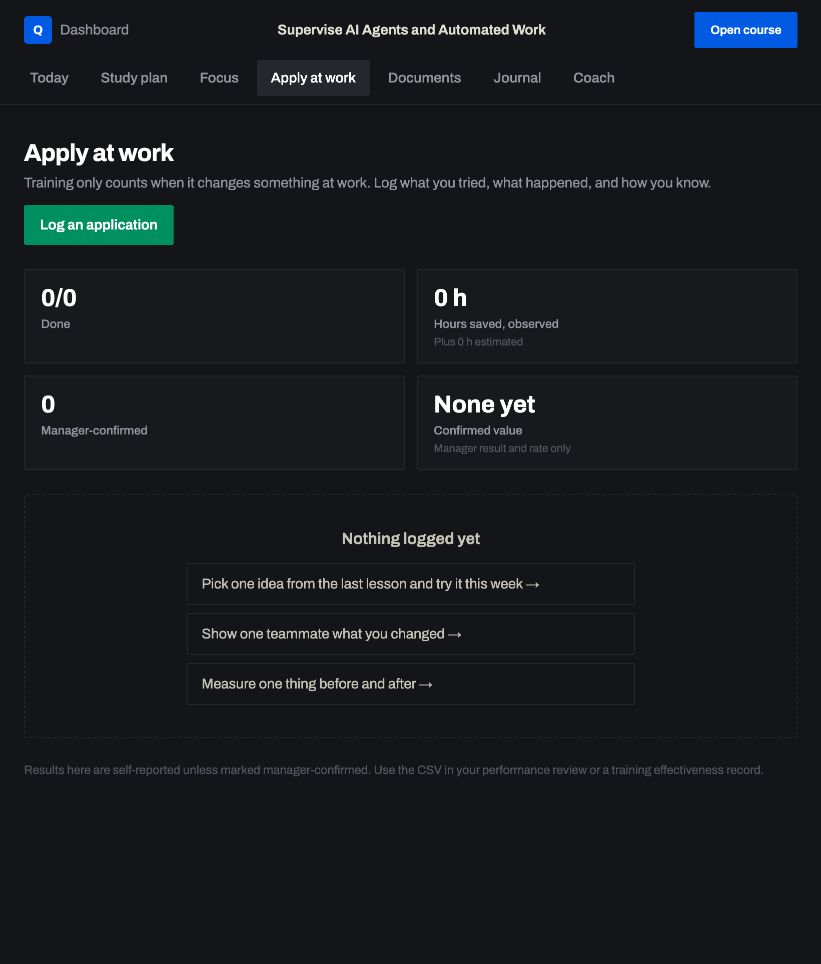
Apply at work · Proof your boss can see
Log what you tried, what happened and how you know. Record your manager's sign-off with their name and date, and export the log for your performance review.
Built around you
Give the study plan your goal date and it sizes each session to your week. Coach Q works on the facts you bring from your own job, so the examples are yours, not a textbook's.
Hands-on, not hours of video
Lessons are built around calls you make: read the record, sort the evidence, catch the mistake. Checks and labs score you on the spot, and your first win comes in the first few minutes of lesson 1.
Stays with you. Stays current.
Coach Q doesn't leave when you finish. It comes with your course, no subscription and no renewal fee, so it's there for the next workflow your team wants to switch on. When the rules behind this course change, we update the lessons and the coach's setup, and we move the coach to newer AI models as we test them.
What you walk out with
Working documents for your own company, not notes.
In Course Hub you pick a template and give Coach Q your facts. It drafts a first version. You edit it, and it's yours to keep and use.
Improve a Process Before You Automate It
- Current-state mapDraft with Coach Q
- Time ladderDraft with Coach Q
- Future-state mapDraft with Coach Q
- Benefits ledgerDraft with Coach Q
- Pilot charterDraft with Coach Q
Supervise AI Agents and Automated Work
- Agent operating briefDraft with Coach Q
- Permission matrixDraft with Coach Q
- Six-test setDraft with Coach Q
- Exception playbookDraft with Coach Q
- Change checklistDraft with Coach Q
Who built it
Built by an auditor who checks the record, not the story.
Will Trikha
Founder and CEO, QMS Learning · Third-party registrar auditor
Will Trikha is a third-party registrar auditor with more than 20 years in aerospace and quality. He's COO of PTX Defense, an AS9100D-certified aerospace manufacturer, and founder of QMS Leader, a consulting firm that implements quality management systems for manufacturers.
The method in this path is an auditor's: decide what's allowed, test it, check the record and judge from the evidence. His own company, QMS Learning, is ISO 27001 certified, and he has trained people at PTX Defense, Alva Manufacturing, Paramount Extrusions, Rikelo Motion Systems and Global Airtech.
Check us before you pay
- Take lesson 1 free. Try the first lesson of Define the Work Before You Delegate It, Improve a Process Before You Automate It, Supervise AI Agents and Automated Work or Write Work Instructions People Actually Follow, with Coach Q. No card. A free preview is not enabled for C01.
- Look Will up. His LinkedIn profile lists the work behind the courses.
- Check a certificate. Every certificate can be confirmed at academy.qmslearning.com/verify.
- Keep your exit. 3 days after you buy a course to ask for a refund.
Try before you buy
Try it before you pay. Change your mind after.
Before you pay
Lesson 1 is free.
Define the Work Before You Delegate It, Improve a Process Before You Automate It, Write Work Instructions People Actually Follow and the agent-supervision course have a free first guided lesson with exercises and Coach Q. A free preview is not enabled for Check AI Work Before You Approve It. Try the first Define the Work lesson →
Try lesson 1 free ↑After you buy
3 days to change your mind.
Email will@qmslearning.com within 3 days of buying a course for a refund. A refund ends access to that course. Refund policy
Company pays
Send it to your manager.
We wrote the email for you, with each course on the path and a link to what it includes. Need a quote or a PO? Email will@qmslearning.com.
Send this to my manager →Questions
Straight answers.
Do I have to take them all?
No. Each course stands on its own, with its own price, assessment and certificate. Start with AI work review, then agent supervision, and add others as they open.
Do I need to code?
No. Supervise AI Agents and Automated Work is about supervising AI workflows: how much they may do, what they may touch, how they're tested and how you judge what they did. No programming needed.
Does it connect to my real accounts or AI tools?
No. The labs use a fictional assistant with fictional records, so you can make the hard calls safely. The method isn't tied to one vendor, so it carries to the tools your team uses.
Is this an accredited certification?
No. Each course gives you a certificate from QMS Learning that anyone can check at academy.qmslearning.com/verify. Supervise AI Agents and Automated Work issues it after an unseen case reviewed by a person and a final exam. It isn't a license or an accreditation, and it isn't approval to run any workflow.
Who makes the call, the AI or a person?
A named person. The course puts approval on the consequential action, like a send to a customer or a change to a record, and has you enforce it in the platform wherever the platform can hold the action, with the instruction in the prompt as a second layer. AI drafts and proposes. People approve and sign.
Training a team?
Open any course on the path and pick how many people before you check out. Five or more people get 10% off every seat, applied at checkout. Each person gets their own login, private coach, study plan and certificate. More than 50 people, or need an invoice instead? Email will@qmslearning.com for a quote.
How long do I keep access?
The lessons are yours for life, and Coach Q comes with your course and stays with you after you finish. There's no subscription or renewal fee.
Does the course keep up when the rules change?
Yes, for the edition it teaches. When the rules or guidance behind this course change, we update the lessons and the coach's setup, and you get the update at no extra charge. When a new edition replaces the standard, we point you to the transition training. Your conversations with Coach Q aren't used to train AI models.
The AI at Work path
Lesson 1 is free. Decide how much autonomy the job really needs.
- Check AI Work Before You Approve It About 3.5 hours
- Define the Work Before You Delegate It About 3.5 hours
- Improve a Process Before You Automate It About 5 hours
- Supervise AI Agents and Automated Work About 3.5 hours
- Write Work Instructions People Actually Follow About 3.5 to 4 hours
- Review Audit Evidence with AI About 3.5 to 4 hours
- Make Better Decisions with Workplace Data About 4 hours
Lessons for life. Coach Q comes with every course, no renewal fee.
Ready to buy? Pick a course from the path. Each course page shows everything included, then the price.